*This post MAY contain affiliate links. That means that if you make a purchase after clicking on a link I may earn a small commission at no extra cost to you. I don’t ever recommend something that I don’t use myself. Not all links are affiliate links. For more information, see our Privacy Policy.
To print this page, click the green Print button below the article. If that doesn’t work, try Ctrl + P (or Flower + P) to bring up the printer dialog box.
Defining Quilting Terms D – O
Quilters use a secret language all their own! Here are some definitions to help you translate quilting language.
Page One: Terms A – C
Page Two: Terms D – O
Page Three: Terms P – Z
Quilting Terms D – P
Determining Fabric Type
If someone gives you an unknown fabric or batting, there are two methods to find out what it is. The most reliable method is to put a thread under a microscope and look at the actual fiber itself. An inexpensive microscope will work. Cotton is twisty and round and looks like a straw. Wool has scales. Silk is smooth and round like spaghetti. Linen has little horizontal joins.
There is also the burn test. Hold a match to a small piece of the fabric and observe the results.
- Cotton, Hemp and Ramie burns steadily and smells like burning leaves or toast. Does not melt. The ash is soft and crumbles easily.
- Linen is very similar but it takes longer to light and smells like burning paper.
- Rayon burns but will not melt. It smells like burning paper or leaves. The gray ash is fine and feathery.
- Silk burns slowly. It shrinks from the flame and will burn itself out before melting. It smells like hair or feathers burning. It burns slowly with a grayish ash which crumbles easily or it can produce a black, hollow irregular bead that powders when you crush it. The residue is a black, hollow irregular bead that can be easily to a gritty black powder. It is self-extinguishing, i.e., it burns itself out. It is delicate when wet.
- Wool (and other protein fibers) smolders and sputters when near flame. It doesn’t burn easily and smells like burning hair. It produces a crisp, dark ash which crushes easily and turns to powder. Wool will also dissolve in chlorine bleach.
- Manmade Fibers (acetate, acrylic, nylon, polyester, rayon, etc.) will melt when exposed to a flame and has an ash like a hard bead (except rayon which disappears.) It smells slightly acidic. Most manufactured fibers both burn and melt, and also tend to shrink away from the flame. May give off black smoke. This test is not as reliable with blends.
Dining room table. Also known as a quilting studio, this piece of furniture can also be used to serve a meal. See: pizza.
Directional print –fabric with a printed pattern that has a definite direction or grain (nap.) Care must be taken to match the direction when piecing.
Dryer Sheets — can be used for appliqué. Sew the used dryer sheet to the front of your appliqué piece, cut a slit in the dryer sheet, turn it inside out, and iron. Your piece will automatically how have the edges turned under. Click here for more. One caveat: dryer sheets can be flammable. A thin piece of cheesecloth is probably a better choice.
Dye Magnet — a great dye magnet is a piece of undyed, untreated terry cloth. Because untreated cotton will absorb fugitive dyes, this plain little piece of cloth will collect all the dye in your wash water. When it is saturated, just bleach it all out and keep using it. Old well-used white 100% cotton terry washcloths, towels, t-shirts, and underwear will work too. Be careful — it can’t be exposed to fabric softener. Fabric softener coats the fibers and will interfere with their ability to absorb dye.
Ease: to make two pieces of different sizes fit together in the same seam. One piece may have to be stretched a little, or bunched up slightly in order to get both pieces the same length. Tip: place the larger side down on the feed dogs of your sewing machine. They move the bottom fabric very slightly faster than the top fabric (which is why you use a walking foot) so they will help ease in the fabric.

Echo Quilting: Quilting stitches that are placed right next to a shape or block, thus echoing the shape.
English Paper Piecing: Found in 18th and 19th century English quilts, this method of hand piecing uses paper templates inside the block elements to guide where the edges are turned under. These papers are later removed.
EQ – Electric Quilt, a computer program for designing quilts.
Fabraholic: A non word. No one can have too much fabric. There is a test for it here.
Fabric starch: Tip: If you like the crisp texture of unwashed fabric, but need to prewash it, use fabric starch instead of fabric softener in a fabric softener ball. Your pre-washed fabric will then get the crisp texture of sizing. Consider washing the final product, however, as starch left in the fabric may attract little critters. Instead of using starch in the wash, you may want to use a can of spray sizing when pressing your prewashed fabric.
Fat 1/8th: Fabric measuring approximately 9″ x 18″. It is half of a fat quarter (see below.)
Fat Quarter – a unit of measurement for fabric, made by cutting a half yard in half again vertically. Usually measures 18″ x 22″. This allows for cutting larger pieces than a regular quarter yard which is 9″ x 44″. What can you get from a fat quarter?
- 99 – 2″ squares or
- 50 – 2 1/2″ squares or
- 42 – 3″ squares or
- 30 – 3 1/2″ squares or
- 20 – 4″ squares or
- 16 – 4 1/2″ squares or
- 12 – 5″ squares or
- 12 – 5 1/2″ squares or
- 9 – 6″ squares or
- 6 – 6 1/2″ squares
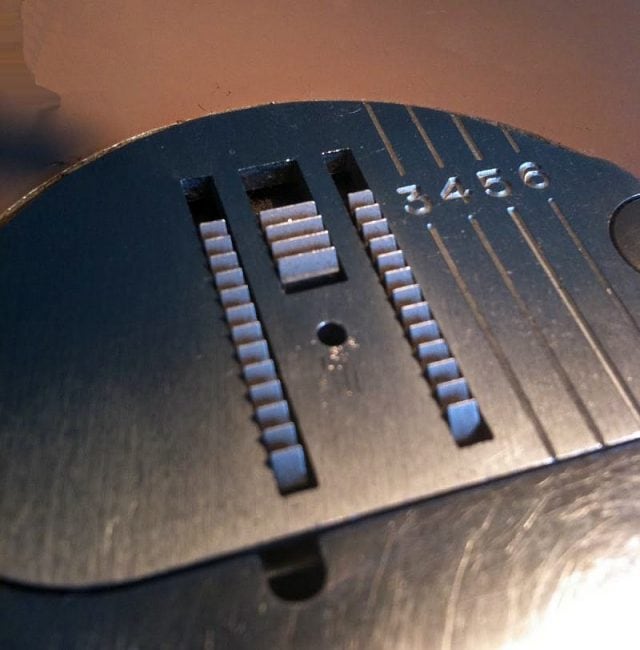
Feed Dogs – Feed dogs are the teeth that pull your fabric through the machine, helping you to sew a nice even stitch. See Free Motion Quilting
Feedsacks: material originally used to hold flour, feed, sugar, salt, etc. Now highly prized for authentic reproduction quilts. From the early 1900’s. Click here for more information.
Fibonacci Sequence AKA Phi
Many quilters use this sequence to help determine block or border size relationships. In this sequence of numbers, each number is the sum of the previous 2 numbers. (In other words: 1,1,2,3,5,8,13,21,34,55,89,144,233, etc.) This “golden number” or “golden ratio” of 1.618 can be seen repeatedly in nature.
You can use this ratio when sizing borders or blocks just by multiplying by 1.618. For example, if you want a quilt that is a perfect rectangle, multiply the width by 1.618 (apx 60%) to get the length. Or, if you want to add a series of three perfectly proportioned borders, just add the width of the first two borders together to get the width of the third. If you would like to add a fourth border, just add the width of border two and border three. See Using Fibonacci in Quilts.
Filling – see batting.
Finger Pressing: Using your fingers to press a seam or guidelines for appliqué turned edges or seam allowances, instead of an iron. A Hera marker works on this principle.
Finished Size The final sewn size of a completed block without seam allowances.
Fire Retardant Formula/Flame Proofing: This is a formula shops use to treat curtains at big quilt shows. Mix 9 oz. Borax, 4 oz. Boric acid (available at most pharmacies), 1-gallon water, and 1/2 teaspoon low suds detergent and pour in a spray bottle. Hang curtains outside (or where ever you can string up some clothesline) lightly spray both sides and let dry. It does stiffen the fabric slightly. You can also purchase flame retardant spray at places like Dharma Trading.
Flannel: is a soft fabric that can be made from cotton, wool, or synthetic fibers. It is usually loosely woven and slightly furry and is very, very warm. It’s tendency to ravel makes it a very good fabric to use for a rag quilt. Because flannel starts out so loosely woven, it does shrink about 5% in the first wash and will continue to shrink with each wash until it is no longer loosely woven.
Fleas – horrible little creatures that eat you alive. To get rid of them without pesticides, sprinkle 20 Mule Team Borax (which has boric acid) or diatomaceous earth (available at pool supply companies) around the house. Make sure to leave it there for at least two weeks to kill any new hatchlings.
Foundation piecing: A method of assembling a block by sewing pieces to a foundation of muslin or plain fabric. Sewing on a foundation of paper is known as Foundation Paper Piecing or FPP.
FQ: See Fat Quarter.
Free-Motion Quilting A type of machine quilting in which the feed dogs are lowered or covered while quilting using a darning foot. Because there are no feed dogs to pull the fabric, the quilter must create the design by moving the quilt sandwich under the needle. Free-Motion Quilting also happens when the dog decides to lay at your feet right on top of your foot pedal.
Freezer paper appliqué. Freezer paper is a wrapping paper for meat that has a light coating of wax-like plastic on one side which can be purchased in most supermarkets. Quilters like to use it as a template for appliqué by drawing the design on the paper side, cutting it out, and ironing the template to the fabric using a very hot, dry iron. These templates can be used on the underside of the fabric by turning the seam allowance over it before appliquéing to the base fabric. You would then need to cut the base fabric to remove the paper. You can also use the template on top of the fabric by using the edge of the freezer paper to guide your needleturn. If your freezer paper doesn’t stick well, it can be attached to fabric using silk pins, basting stitches or a glue stick. See our article on how to applique using fusible web.
Frog Stitching: Rip it, rip it, rip it!
Fusibles Various webs or interfacings that can be ironed onto fabric for easier appliqué or to support the fabric.
Glue Stick Available in any office supply store, glue sticks can keep small, narrow strips from wandering while being appliquéd in place.

Grain –The lengthwise and crosswise threads of a fabric, along the warp (length) and weft (crosswise) threads. The lengthwise grain parallel to the selvage stretches the least and should be used for borders whenever possible. The crosswise grain perpendicular to the selvage has slightly more give. Selvages are created as the weft threads are tightly woven through the warp threads.
Griege goods: refers to woven textiles as they come from the loom before they are dyed or printed and sold as finished goods. This fabric has been removed from the loom, but has no further processing, bleaching or finish applied to it. It is pronounced, “gray goods”. See How to choose the best quality fabric for your quilts.
Handquilting. Hand quilting is a running stitch that is made through all three layers of a quilt to hold them together.
Hanging Sleeve A tube sewn to the back top of a quilt to allow it to be hung. To make one, cut a strip of fabric 9″ wide by the width of the quilt (seamed if necessary) and hem the ends. Fold in half lengthwise, wrong sides together, and sew to the unfinished edge of your quilt. Your binding will later cover this seam. If your quilt is already bound, fold the strip right sides together and sew into a tube. Turn the tube inside out and attach to the top of the quilt under the binding. With either method, you will have to hand sew the loose bottom edge of the tube to the quilt. If you made the quilt, make the sleeve out of fabric used on the top so that if fabric is needed to repair the top in the future, it will be readily available.
How big should I make my quilt? See standard mattress sizes
HST: half square triangle
Intentional Mistake. The reason quilters give when their quilt is not perfect. Also called “only God can make something perfect”, “creative sewing” and “oops”. It’s a myth that Amish people always deliberately include a mistake in their quilting.
Invisible Thread. Also known as Monofiliment thread. Click here for a comparison of the different brands including usage recommendations.
Jelly Rolls (et al)
Manufacturers provide quilt shops with fabrics precut into strips. These cuts all have different names. Here are just a few:
- Bali Bitty Bundles – eight fat-eights (9″ x 22″)
- Bali Pops by Hoffman are 2 1/2″ wide x WOF
- Charms by Moda are 5″ squares
- Charms by RJR are 5 1/2″ squares
- Chunky Strip collections – twenty 4″ wide strips
- Desert Rolls by Moda are 5″ strips x WOF
- Fabrications by Blank Textiles are 2 1/2″ strips x WOF
- Fat Rolls by Windam are 5″ wide x WOF
- Honey buns by Moda are 1-1/2″ strips
- Jelly Rolls by Moda are 2 1/2″ wide X WOF
- Layer Cakes by Moda are 10″ squares
- Lil’ Bits by Marcus are 5″ squares
- Noodle Jelly Rolls by Fabric Freedom are 2 1/2″ strips
- Pastry Rolls are 12″ wide strips
- Spoonfuls by Moda are 8-1/2″ squares
- Sushi rolls by Lecian are 2-7/8″ strips x WOF
- Sweet Rolls 6″ strips x WOF
- Sweet Sixteens by Maywood are 9″ x11″ rectangles (1/16th of a yard)
- Tonga Dimes by Timeless Treasures are 10″ squares
- Tonga Nickles by Timeless Treasuresare 5″ squares
- Turnovers by Moda are 6″ half-square triangles
- Twice the Charm by RJR are 5 1/2″ x 22″ strips
- Watercolor Wraps by Hoffman are 7″ squares
Label. Always attach a label to your quilts giving the name of the quilt and the name and town of the maker as well as the year made and pattern used. The more information you can include about the maker, the recipient and the reason it was made, the better. Quilt in the label if possible so it can not easily be removed. Take the time to write your name in the seam allowance of the binding, too, as a surprise to future quilt historians!
Lap quilting – First used in the 19th century, this method of making a quilt by finishing the blocks individually and putting them together later was popularized by Georgia Bonesteel in the 1980’s.
Layout The arrangement in which blocks are sewn together to make a quilt. A straight set layout occurs when quilt blocks are simply sewn next to each other in rows and the rows are set together. An on-point quilt is a straight set layout with the blocks set on a 45 degree angle. Click here for help on piecing an on point quilt. Bargello quilting consists of off-set blocks of color in a rising or falling “flame-like” pattern. One patch or tessellating quilts depend on fabric placement for their design. Wholecloth quilts depend on the quilting for their design. Cheatercloth quilts have a stamped design.
Long Arm Quilting Quilting using a very long bed (commercial) quilting machine to do the overall quilting.
Muslin
An inexpensive, medium weight, plain weave, low count (less than 160 threads per square inch) cotton sheeting fabric. Fabric with a higher thread count (180 to 250 threads per square inch) is called percale. Higher thread count fabric is excellent for photo transfer but not for quilting. The lower the thread count, the easier it is to needle.
Marking Stains. ALWAYS test your pencil or marker on scrap fabric before using it on your quilt! If you are having trouble removing the marking lines on your quilt, try this recipe:
3 oz rubbing alcohol
1 oz water
4 drops clear liquid dishwashing detergent
Dip a clean soft bristled toothbrush in the solution and brush onto fabric. Blot dry.
1/4 tsp of baking soda dissolved in 1/4 cup water will sometimes neutralize the blue markers to make it easier to remove.
Mitered corner: corner (usually of a border) that is joined at a 45 degree angle, like a picture frame. Tip: If your quilt plan calls for multiple mitered borders, stitch all the strips together first, then apply and miter them as a single unit.
Motif – an patch used for appliqué.
Needles
- Sharps have a sharp point which pierces the thread of woven fabrics. Available in sizes 60/8 – 90/14, they are a good choice for straight stitch sewing. They are marketed under different names. Schmetz calls their sharp needle Microtex, Dritz uses Standard Point.
- Metallic needles are constructed specifically for use with metallic and monofiliment threads. They are thin, with a sharp point to eliminate thread breakage, an elongated eye to make threading easier and an elongated scarf to prevent shredding. Metallic needles are marketed as Metallica (Schmetz), Metafil (Lammertz) and Metallic Machine Embroidery (Madeira), and are available in sizes 70/10 through 90/14.
- See our article on Choosing the Correct Sewing Machine Needle
On Point: a square block that is set on edge, with the corners on top and bottom, side and side. Click here for an illustrated article with charts on side setting triangles, corner setting triangles and setting a block on point.
Orvus: Known as Horvus in veterinary circles, this is a cleaning product that is very mild and often used to clean fine washables such as quilts. Must be rinsed thoroughly. Click here for an article on cleaning antique quilts.